 |
Please select country!!
Created: 30 Nov -0001
Last Updated: 16 Nov 2019
Here are the questions I get asked most about COMAND-APS (The DVD based Mercedes Sat-Nav system) (also known as NTG1 and NTG2)
Questions:
1 What models does this FAQ apply to?
2 What is NTG1, NTG2, NTG2.5, NTG3, NTG3.5, NTG4 etc
3 How do I retrofit COMAND APS to my car?
4 What cars are factory fitted with COMAND-APS ?
5 Where can I buy the map disks ?
6 My Mercedes was not supplied with the COMAND-APS system. Can this be retrofitted ?
7 Who can retrofit COMAND-APS to my car
8 Where can I get a manual for COMAND APS ?
9 What part number for COMAND-APS do I need ?
10 What are the connectors on the back of COMAND-APS ?
11 Who makes COMAND-APS ?
12 What bits make up COMAND-APS and what do they do ?
13 What hidden menus are there ?
14 I got an E class unit, will it go in my C class ?
15 I just installed COMAND-APS and it immediately turns off -Why ?
16 What Map disks work with COMAND-APS ?
17 What are the map disk part numbers ?
18 Are software upgrades available for COMAND-APS ?
19 How do I get Estimated Time of Arrival on the screen
20 My COMAND-APS has 3 part numbers on the label - what do they mean ?
21 The dealer can't activate the instrument cluster Navigation screen.
22 The dealer can't make my phone work after installing COMAND
23 Can I reset my COMAND-APS, its going slow, not finding many satellites etc ?
24 Can I put a European COMAND-APS onto a North American car ?
25 Can I enable MP3 ?
Answers:
1. What models does this FAQ apply to?
This FAQ applies to the DVD based COMAND systems (known as NTG1 and NTG2). There is some information in this FAQ about NTG3/NTG3.5 (S/CL) and NTG4-W204 (W204 C/GLK) and NTG4-W212, (W212,W207 E). There is a separate FAQ for the NTG2.5 Hard Disk based system Here.
2. What is NTG1, NTG2, NTG2.5, NTG3, NTG3.5, NTG4 etc
NTG1 was the first DVD based system fitted to the W211 E class, the CLS class, the old W220 and W215 S and CL classes, the SL and the SLK. The navigation processor was seperate and in the boot (trunk) of the car. The AGW (amplifier, tuner and diagnostic interface) is also part of this setup and it is a seperate hidden unit in the boot or under the passenger feet in the SLK. This sytem first appeared in 2002 although it was mid 2003 (MY2004) before it appeared in the S/CL and mid 2004 (MY2005) in the SL.
NTG2 was then introduced for the A/B/C/CLK/ML/R/GL vehicles, the navigation DVD was then in the head unit (with the AGW also). This first appeared with the Model Year 2005 facelift C/CLK (ie from Q2 2004).
NTG3 was then introduced in the new W221 S and W216 CL vehicles, with an internal hard disk for the map but no Bluetooth phone support in the head unit. A seperate rotary controller is used to control the NTG3 unit
NTG4 was then introduced for the W204 C class, which is a cost reduced NTG3 with bluetooth in-built and is also the W212/W207 new E class and E class coupe but requires different map disks. The W212/W207 version does not have the folding display screen that exists in the W204. Early pictures of the SLS (W197) indicate that has the same system as the W212/W207. i.e also NTG4.
And NTG2.5 was introduced for Model Year 2009 vehicles (except those with NTG3/4), which has a built in hard disk, bluetooth, and no seperate controller. NTG2.5 was introduced for the Vito, Viano and Sprinter for Model Year 2010.
NTG3.5 was introduced for the S and CL for MY2010 which now includes bluetooth in the head unit.
NTG4.5 was introduced around MY2011 in the E class and extended across the range.
NTG5 was introduced with the W222 S Class, and then with the W205 C class and then began to be extended across the range in 2015 (with the facelift W246 and the CLA, and then further vehicles as the MY2016 facelift (or later) was done.
3. How do I retrofit COMAND APS to my car?
Look at my document Retrofitting COMAND APS. This covers A and B class in detail, but the principle is the same for C, CLK ,ML, GL. There are other documents on Mercupgrades.com that cover how to install the head unit for different vehicles. The E / CLS / SL / SLK system is more difficult as it has units in the boot (trunk) as well as the centre console, and I hope to add some information on that shortly.
4. What cars are factory fitted with COMAND-APS ?
The new A class (W169), B Class (W245), C Class (W203) from roughly April 2004, CLK (W209) from roughly June 2004, E Class (W211), CLS (W219), GL (X164), new M Class (W164), R Class, SL Class from roughly June 2005, S class (W220) from MY2004, CL class from MY2004 and the Smart ForFour. The latest S (W221) and CL (W216) class have newer systems which are not really covered by this document. Note that the A/B/C/CLK/ML/R/GL in the USA before MY2009 is not fitted with COMAND-APS it is fitted with MCS-II which is completely different to COMAND-APS. MY2009 onward get NTG2.5.
5. Where can I buy the map disks ?
You can buy new genuine European map disks from Comand Online Web Shop
Theres a good supply of older European map disks on EBAY. But make sure you are not getting a copy or a "backup disk". Click
Here
for a suitable ebay search.
But beware, there are plenty of fake copies - make sure you really do buy the latest version, and the correct version for your vehicle - there are now lots of types of map disk and the numbers clash, and the latest releases do not have the same number - for instance Version 6.0 for E/CL/S/SL/SLK/CLS is different to Version 6.0 for the A/B/C/CLK/ML/GL/R - but actually V16.0 is current for W211-E (etc) and Version 16.0 is current for A/B/W203-C/(etc) and they are different disks.
6. My Mercedes was not supplied with the COMAND-APS system. Can this be retrofitted ?
Retro-fitting European and US A/B/C/CLK/M/GL/R and Smart ForFour with COMAND-APS is relatively easy because all componenents are contained in the single head unit. Other vehicles are more complicated as extra wiring is needed as the AGW (Audio Gateway) and the DVD navigation processor are often seperate.
7. Who can retrofit COMAND-APS to my car
Most Mercedes dealers will not - or it will cost an arm an a leg. If you are in the UK, then the best people to supply and fit (or arrange fitting) is Comand.co.uk. In Australia, see Benzmodz. And, Steve at MBenzNL visits the US and probably most of the world regularly on "retrofit missions" fitting COMAND and lots of other stuff to Mercedes vehicles.
8. Where can I get a manual for COMAND APS ?
You can get European manuals for the A/B/W203-C/W209-CLK/ML/GL/R and E/CLS class COMAND APS manuals from Comand Online Webshop. They are very hard to get hold of as Mercedes seem to only stock in small batches and run out quickly the the shop runs out of stock quite often.
Most of the USA COMAND manuals are Here.
9. What part number for COMAND-APS do I need ?
There is a document on My site with part numbers for COMAND and COMAND-APS.
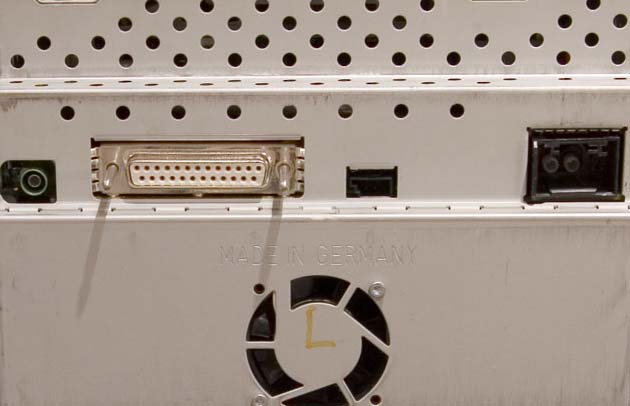
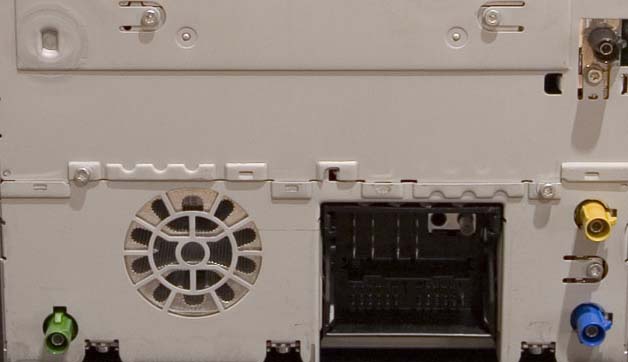
10. What are the connectors on the back of COMAND-APS ?
The E/CLS units have between 1 and 4 connectors depending on whether the unit has video capability. The A/B/C/CLK/etc units have more connectors because they contain the AGW (and thus the tuner) and the Navigation processor.
| 1 | Green FAKRA - Video Input (only if Video capable) |
|---|---|
| 2 | 25-way D-Type - Rear Screen (only if Video capable) |
| 3 | 3 Way - AUX audio input |
| 4 | Multiway - Power, Ground, Wakeup & MOST fibre plug |
| 1 | Green FAKRA - Video Input |
|---|---|
| 2 | Blue FAKRA - GPS aerial |
| 3 | Yellow Fakra - 2nd FM Aerial |
| 4 | Black Fakra - Main FM Aerial |
| 5 | Multiway connector - AUX, Power, Speakers, MOST Fibre connections |
11. Who makes COMAND-APS ?
Harman Becker and Siemens make the COMAND-APS units. Siemens seem to make the S(W220)/CL(W215)/SL units and the USA versions of the E/CLS/SLK units. Becker seem to make the others. There may be Becker versions of the USA E/CLS units. The USA A/B/C/CLK/ML/GL/R unit is not COMAND-APS, it is MCS-II and is made by Alpine. NTG2.5 are made by another manafacturer.
12. What bits make up COMAND-APS and what do they do ?
There are a number of components that make up the COMAND system, in some cars many of these components are in the main display unit, in others they are distributed around the vehicle.
Audio Gateway (AGW) - this unit contains the Tuner (radio), the MOST fibre optic controller and the diagnostic interface.
COMAND - this is the display module
Navigation - this module provides navigation functionality.
In the A/B/C/CLK/ML/GL/R/ForFour all 3 of these units are built into the display module. On other vehicles the Navigation system is in the trunk (boot) of the car. The AGW is either near the Navigation system, or built into the head unit. (Certainly on S/CL/SL it is built into the head unit). The US COMAND-APS unit is very different, and in fact is known as MCS-II - the navigation unit is in the head unit, but it is an option and can be added (or removed) later.
13. What hidden menus are there ?
On the E/CLS, holding down 1,3,8 keys simultaneously just after COMAND-APS is turned on without a CD in the drive will put the COMAND-APS into 'update' mode, waiting for a service CD to be inserted.
On NTG2 modes you can see the Navigation internal menu by pressing NAV, letting go and then holding NAV and the 5 key for about 10 seconds. This may work for NTG1 as-well.
On NTG1/NTG2 you can enter the 'Engineering Menu', firstly go to the language menu by pressing SERV key, then the System soft-key, then the Lang. soft key.
Now hold down the 'phone-hangup' key, the small key between up and left on the arrow pad, and the Audio key. This should enter Engineering mode.
In the past there was another key sequence used from Engineering mode (only on NTG1) which would then allow you to watch DVD/TV in motion. This seems to be deleted now, and as I think its a bad idea, please do not ask be about it.
Please be careful in engineering / nav mode - you can delete files and render your COMAND useless.
14. I got an E class unit, will it go in my C class ?
The units will only fit in the vehicle they are designed to. This means the part number starts with the model series - i.e A211 870 xx xx goes in an E class (W211). However, some cars are based on each other (such as A and B, or E and CLS) and use the same units.
B class (W245) uses A class (W169) units, CLS (W219) uses E class units (W211), CL (W215) uses S (W220) units and GL (X164) uses ML (W164) units. CLK (W209) units and C Class (W203) units are definetly not interchangable.
15. I just installed COMAND-APS and it immediately turns off -Why ?
COMAND-APS will display the Mercedes Star and turn straight off (or within a short while) if its expecting equipment on the MOST fibre optic network that is not present. You will need to get the unit coded by the MB dealer and his Star Diagnosis computer.
16. What Map disks work with COMAND-APS ?
The map disks are different for the A/B/C/CLK/ML/R/GL/Smart-forfour and the E/CLS/S/CL COMAND systems, and of course, the numbering systems overlap.
Version 6.1 for A/B/C(etc) was the first disk to support TMC in the UK (older versions supported TMC in other parts of Europe. Version 5.0 was the first E/CLS/etc disk to support UK TMC
The current A/B/C/CLK/ML(etc) disk for Europe is V16.0 (2014/2015). The current for E/CLS/(etc) is Version 16.0 (2015/2016) is the current version for E/CLS/(etc) disk.
The latest maps are available from Comand Online Ltd and there is a good supply of older European map disks on EBAY. Click
Ebay Search for COMAND-APS map disks.
17. What are the map disk part numbers ?
These are the European map disk part numbers.
| NTG1: E/CLS/S/CL/SL/SLK/Maybach (Europe) |
|---|
| Version 3.0 | B6 782 3341 | A211 827 52 59 | |
| Version 4.0 | B6 782 3369 | A211 827 67 59 | |
| Version 4.1 | B6 782 3395 | A211 827 81 59 | |
| Version 5.0 | B6 782 3489 | A211 827 68 59 | |
| Version 5.1 | B6 782 3627 | A211 827 93 59 | |
| Version 6.0 (2007) | B6 782 3659 | A211 827 95 59 | |
| Version 7.0 (2007/2008) | B6 782 3855 | A211 827 10 65 | |
| Version 7.0 Platinum | B6 782 3879 | Spain/Portugal Only | |
| Version 8.0 (2008) | B6 782 3886 | A211 827 15 65 | |
| Version 9.0 (2008/2009) | B6 782 3887 | A211 827 21 65 | |
| Version 10.0 (2009/2010) | N/A | A211 827 24 65 | Oct 2009 |
| Version 11.0 (2010/2011) | N/A | A211 827 33 65 | Jun 2010 |
| Version 12.0 (2011/2012) | N/A | A211 827 39 65 | Jul 2011 |
| Version 13.0 (2012/2013) | N/A | A211 827 42 65 | Aug 2012 |
| Version 14.0 (2013/2014) | N/A | A211 827 45 65 | Aug 2013 |
| Version 15.0 (2014/2015) | N/A | A211 827 46 65 | Mar 2014 |
| Version 16.0 (2015/2016) | N/A | A211 827 00 01 | June 2015 |
Please note that if you are upgrading your map disk from Europe V3.0 or USA V2004.2 to Version 7 in the NTG1 systems vehicles your navigation unit may need a firmware update to recognise the disk. This is a 5 minute procedure using disk W211 589 15 22 00. It is not needed for an upgrade to V9 or later.
| NTG2: A/B/C/CLK/ML/GL/R/Smart-ForFour (Europe) |
|---|
| Version 2.0 | N/A | A169 827 12 59 | |
| Version 2.1 | N/A | A169 827 16 59 | |
| Version 3.0 | B6 782 3379 | A169 827 14 59 | |
| Version 4.0 | B6 782 3386 | A169 827 20 59 | |
| Version 6.0 | B6 782 3490 | A169 827 26 59 | |
| Version 6.1 | B6 782 3641 | A169 827 33 59 | |
| Version 6.2 | B6 782 3674 | A169 827 36 59 | |
| Version 6.3 | B6 782 3695 | A169 827 45 59 | |
| Version 8.0 (2007) | B6 782 3743 | A169 827 51 59 | |
| Version 9.0 (2007/2008) | B6 782 3848 | A169 827 50 59 | |
| Version 9.1(2007/2008) | B6 782 3893 | A169 827 56 59 | |
| Version 10.0 (2008/2009) | B6 782 3944 | A 169 827 58 59 | Oct 2008 |
| Version 11.0 (2009/2010) | N/A | A169 827 65 59 | Jul 2009 |
| Version 12.0 (2010/2011) | N/A | A169 827 74 59 | May 2010 |
| Version 14.0 (2012/2013) | N/A | A169 827 83 59 | |
| Version 15.0 (2013/2014) | N/A | A169 827 87 59 | May 2013 |
| Version 16.0 (2014/2015) | N/A | A169 827 88 59 | May 2014 |
| Version 17.0 (2015/2016) | N/A | A169 827 01 00 | July 2015 |
NTG2.5 details are available Here
| NTG3: New S/CL-Class (W221/W216) (Europe) |
|---|
| Version 3.0 | B6 782 3699 | ||
| Version 20070 | B6 782 3700 | ||
| Version 2007/2008 | B6 782 3899 | ||
|---|---|---|---|
| Version 2008/2009 | B6 782 3949 | ||
| Version 2009 | A221 827 56 59 | ||
| Version 2009/2010 | A221 827 67 59 | Oct 2009 | |
| Version V10.0 2010/2011 | A221 827 68 59 | Apr 2011 | |
| Version V11.0 2012/2013 | A221 827 03 65 | 2012 | |
| Version V12.0 2013/2014 | A221 827 10 65 | Dec 2013 | |
| Version V13.0 2014/2015 | A221 827 11 65 | Apr 2014 | Version V14.0 2015/2016 | A216 827 10 00 | Jun 2015 |
Â
| NTG4-204: New C/GLK (W204), SLS (Europe) |
|---|
| Version 2008 | A204 827 36 59 | ||
|---|---|---|---|
| Version 4.1 (2008/2009) | A204 827 57 59 | Dec 2008 | |
| Version ?? | A204 827 46 59 | ||
| Version 6.0 (2009/2010) | A204 827 47 59 | Oct 2009 | |
| Version 7.0 (2010/2011) | A204 827 48 59 | Oct 2010 | |
| Version 8.0 (2011) | A204 827 76 59 | Q2 2011 | |
| Version 9.0 (2011/2012) | A204 827 83 59 | Dec 2011 | |
| Version 10.0 (2012) | A204 827 92 59 | ||
| Version 11.0 (2013) | A204 827 98 59 | ||
| Version 12.0 (2014/2015) | A204 827 09 65 | ||
| Version ??.0 (2015/2016) | A204 827 02 00 | Feb 2016 |
Â
| NTG4-212: New E/Coupe/Convertible (W212/W207) (Europe) |
|---|
| Version 1.41 (2008/2009) | A212 827 26 59 | Â |
| Version 2.0 (2009/2010) | A212 827 12 59 | Â | /tr>
| Version 2.1 (2009/2010) | A212 827 39 59 | Â | /tr>
| Version 3.1 (2010) | A212 827 54 59 | May 2010 |
| Version ?.0 (2010/2011) | A212 827 48 59 | ?? |
| Version 5.0 (2011) | A212 827 49 59 | ?? |
| Version 6.0 (2011/2012) | A212 827 59 59 | ?? |
| Version 7.0 (2012) | A212 827 69 59 | ?? |
| Version 8.0 (2013) | A212 827 76 59 | Aug 2013 |
| Version ?.? (2014) | A212 827 90 59 | ?? |
| Version ?.? (2015/2016) | A212 827 02 00 | Sep 2015 |
All vehicles with factory fitted COMAND from MY2011 will include 3 years of free map updates done by the dealers.
18. Are software upgrades available for COMAND-APS ?
As described above there are 3 different parts of COMAND-APS, the AGW, the Navigation processor and the display unit. In the A/B/C/CLK(etc) (and with NTG2.5) all units are in the same physical head unit. In other models the Navigation processor and often the AGW are separate.
In all cases the AGW is only updatable by the dealer using their Star Diagnosis machine. The same is true for NTG2.5 units.
The navigation processor software normally is on the Navigation disks itself and therefore updates when a new mapdisk is inserted - however there are also sometimes releases that are for the navigation processor and thus applied using the navigation processor's DVD drive.
On A/B/C/CLK/ML/GL/R there is a software release (May 06) for the US headunit to enable MP3 playback. The US unit is very different to EU units (the navigation processor can be removed from the head unit) and therefore the MP3 update/functionality is not available for Europe. There are two or three current disks shown for this update in the list below - different disks are for different part number head units.
The European and USA CL/S/SL units (made by Siemens) update disk is W220 589 03 22 00
There are also specific E and SLK class update disk for Becker units which add MP3 support to older units and fix various issues.
On the SLK/E/CLS/CL/SL/S the navigation processor is seperate (in the boot/trunk) and has its own DVD - the update disk is W220 589 04 22 00. The navigation processor on other cars is built into the head unit.
| Current Software Update Disks |
|---|
| Region/Vehicle | Disk Part Nr | Announced | Version/Date Details |
|---|---|---|---|
| EU SLK HeadUnit | W171 589 03 22 00 | 18 Jan 2007 | SW-Rel 21.090 30/06>/TD> |
| US SLK HeadUnit | W171 589 04 22 00 | 18 Jan 2007 | SW-Rel 22.100 46/06 |
| US ML/C/CLK/B/R HeadUnit with MP3 | W203 589 03 22 00 | 5th May 2006 | SW 52/ 05 |
| US ML/C/CLK/B/R HeadUnit without MP3 | W203 589 04 22 00 | 5th May 2006 | SW 51/05 |
| US ML/C/CLK/B/R Nav Processor | W203 589 05 22 00 | 5th May 2006 | SW 31/04 |
| EU E,CLS HeadUnit | W211 589 13 22 00 | 18 Jan 2007 | SW-REL 21.090 30/06 |
| US E,CLS HeadUnit | W211 589 14 22 00 | 18 Jan 2007 | SW-Rel 22.100 46/06 |
| US/EU SLK/E/CL/CLS/S/SL Navigation Processor | W220 589 04 22 00 | 22 March 2006 | SW-Rel 1.91 |
| EU/US CL/S/SL HeadUnit | W220 589 05 22 00 | 4 Oct 2006 | SW-Rel 22/06 - 25/06 |
| EU Maybach | W240 589 06 22 00 | 22 Feb 2006 | SW-Rel 15.130 Build 51/05 |
| US Maybach | W240 589 07 22 00 | 22 Feb 2006 | SW-Rel 16.150 Build 04/06 |
| Old Software Update Disks |
|---|
| Region/Vehicle | Disk Part Nr | Announced | Version/Date Details |
|---|---|---|---|
| EU SLK HeadUnit | W171 589 00 22 00 | SW-Rel 9.390 Build 15/04 | |
| EU SLK HeadUnit | W171 589 01 22 00 | 26 Jan 2006 | SW-Rel 15.130 Build 51/05 |
| US SLK HeadUnit | W171 589 02 22 00 | 22 Feb 2006 | SW-Rel 16.150 Build 04/06 |
| US C/CLK HeadUnit | W203 589 00 22 00 | 25 Jan 2005 | |
| US ML/C/CLK/B/R HeadUnit | W203 589 01 22 00 | 22 Sept 2005 | |
| US ML/C/CLK/B/R HeadUnit | W203 589 02 22 00 | 19 Apr 2006 | SW-Rel E11.1 Build 50/05 |
| EU E/CLS HeadUnit | W211 589 00 22 00 | SW-Rel 7.130 11-06-2003 | |
| EU E,CLS HeadUnit | W211 589 06 22 00 | 26 Nov 2003 | SW-Rel 9.390 Build 17/04 |
| US E,CLS HeadUnit | W211 589 07 22 00 | 11 May 2004 | SW-Rel 10.270 Build 13/04 |
| EU E,CLS HeadUnit | W211 589 10 22 00 | 26 Jan 2006 | SW-Rel 15.130 Build 51/05 |
| US E,CLS HeadUnit | W211 589 11 22 00 | 22 Feb 2006 | |
| US CL/S/SL HeadUnit | W220 589 02 22 00 | 5 Aug 2005 | Built 21/10/2004 |
| EU/US CL/S/SL HeadUnit | W220 589 03 22 00 | 1 Dec 2005 | SW-Rel V28.X.14 Build 51/05 |
| EU Maybach | W240 589 03 22 00 | ||
| US Maybach | W240 589 05 22 00 |
| Other Software Service Disks |
|---|
| Part Nr | Vehicles | Usage |
| W211 589 15 22 00 | E/CLS (etc) | Navigation drive firmware |
| W203 589 06 22 00 | A/B/C/CLK (etc) | Head unit software reset |
19. How do I get Estimated Time of Arrival on the screen
The ability to display ETA below the map whilst navigating was added for Model Year 2007. The software needs to be upgraded in the system to enable this by your Mercedes Dealer - see the sofware section in this FAQ.
20. My COMAND-APS has 3 part numbers on the label - what do they mean ?
The first part number is the unit itself, the second is normally the audio-gateway if the unit contains one, and the third is the software initially installed on the audio-gateway.
21. The dealer can't activate the instrument cluster Navigation screen.
The latest cars (such as new A class) clusters are coded with a 'SCN' code which the dealer gets from Mercedes-Benz. This code is generated from the MB 'FDOK' database which lists exactly what options the car has, its model year and other important information. So the dealer must have Mercedes add the option code for COMAND APS (527 in Europe) to FDOK, wait for that to be actioned then request the new SCN code and recode the cluster. Some European dealers have the ability to update FDOK themselves, mostly the country headquarters have to do it.
22. The dealer can't make my phone work after installing COMAND
This applies to the COMAND-APS with the map disk in the head unit.
When the dealer uses Star Diagnosis and runs through the initial startup sequence they must tell the COMAND APS that there is something on the MOST ring. If they do not, then COMAND APS never looks on it's MOST ring. Telling the COMAND to 'set configuration to match what is actually on the ring' does not work if the COMAND-APS was set to have nothing on the ring. They should set the order of the ring as AGW, Phone, COMAND, save that and then re-scan the ring. Just occasionally the unit needs a proper reset (pull the fuse in the fusebox) after the ring order is set in order for it to be able to find the items on the ring.
23. Can I reset my COMAND-APS, its going slow, not finding many satellites etc ?
On the COMAND-APS with the map disk in the head-unit, hold down the 5 button, wait a second, then hold the 3 button as-well, wait a second then hold the 7 button as-well (you will now be holding down 3 buttons). The unit will then stop responding, and a few seconds later it will reboot.
24. Can I put a European COMAND-APS onto a North American car ?
You can not put a European NTG2 COMAND APS for A, B, C, CLK, ML, GL, R class into a US/Canada vehicle (for use in North Amercia) because the MAP disks are not compatable and thus Navigation will not work. The US unit (MCS-II) is made by Alpine and completetly different to the European (and rest-of-world except Japan) unit made by Becker.
If you are bring a US NTG1 vehicle to Europe, you can use the EU map disk hapilly although you may consider switching the head unit as radio frequencies are different.
If you are bringing a US NTG2 vehicle to Europe, then you can put the European COMAND APS system in, it has the same connectors, and its just a case of swopping the units over and having it coded to understand the other audio related control units in your car. If the car has reversing camera then you will need this adapter.
We are not sure whether you can load EU maps into a US NTG2.5 (hard disk) unit, but we do know they run the same firmware so suspect it is possible although Mercdes dealer may need to code the COMAND unit with Star Diagnosis.
I do not know if E/CLS/S/CL/SLK/SL units are interchangeable. I suspect the SL unit is, since both units are made by Siemens.
25. Can I enable MP3 ?
There is a firmware update for early NTG1 and for USA ("MCS-II") systems that then enables MP3 playback. NTG2 (Europe/rest-of world) does not have the MP3 decoder hardware so can not play MP3s.
If you found this information useful, please support the site by making a donation via Paypal. Any amount at all helps me improve the information on the site. |
Comand Online Ltd - the place to buy Mercedes iPod kits, phone kits, retrofit parts & map disks MY AUTOCAR - THE BEST PLACE TO TALK CARS |


